

Description
Noteware Lenovo Compatible
Y520 / RESCUER R520 / R720-15 / Y720
HDD Cable – Hard Disk Connection Cable
Product Description
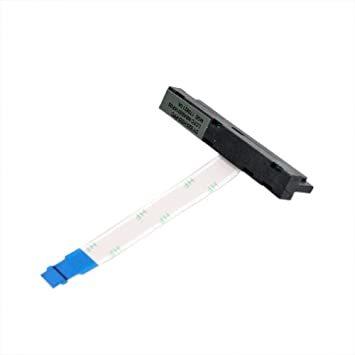
This product is a Noteware-compatible HDD/SSD data and power connection cable designed for Lenovo Y520, Rescuer R520, R720-15, and Y720 laptops.
This cable provides data and power connectivity between a 2.5” SATA hard drive or SSD and a laptop motherboard. If the existing cable is damaged, experiencing contact issues, or has a connection break, this replacement cable easily resolves the problem.
Compatible Models
This HDD cable is compatible with the following Lenovo/Rescuer models:
-
Lenovo Y520
-
Rescuer R520
-
Lenovo R720-15
-
Lenovo Y720
⚠️ Important: There may be different sub-variations under the same model names.
It is recommended that you check your device model and the cable's connector type before placing your order.
Product Technical Specifications
-
Product Type: HDD/SSD data & power connector cable
-
Compatible Brand: Lenovo / Rescuer
-
Compatible Models: Y520 / R520 / R720-15 / Y720
-
Interface: SATA (HDD / SSD)
-
Connection: Motherboard ↔ HDD/SSD
-
Condition: New / unused
-
Quality: Noteware compatible – OEM standards.
What is it used for?
-
If you have a hard drive or SSD connection problem in your laptop
-
If the system does not recognize the disk even though the disk is inserted
-
If the system does not start or the storage unit is inaccessible
👉 This cable can easily solve the connection problem.
Package Included
-
1 x Noteware Lenovo Compatible HDD/SSD Connection Cable
Product Advantages
-
✅ Secure data and power connection between motherboard and HDD/SSD.
-
✅ Compatible structure and dimensions with the original cable.
-
✅ Economical and practical repair solution
-
✅ Ideal for technical services and individual users
Assembly and Usage Information
-
The laptop must be turned off and the battery disconnected.
-
Remove the back cover.
-
Carefully remove the old HDD/SSD cable.
-
Install the new cable properly and check the connections.
-
Close the back cover and turn on the device.
⚠️ The HDD/SSD cable is a delicate part; avoid excessive force during installation.
Incorrect installation can cause the device to malfunction.
Warranty and Return Information
-
Warranty: Seller/supplier warranty against manufacturing defects.
-
Not covered by warranty:
-
User-caused damage
-
Physical impact or liquid contact
-
Return:
-
The product can be returned within 14 days , provided it is unassembled and unused .
Why a Noteware Compatible HDD Cable?
-
High compatibility with Lenovo and Rescuer laptops.
-
Manufacturing to OEM standards.
-
Reliable and uninterrupted data transfer.
-
The preferred spare part of technical services.